Jacks Village
About Jacks Village
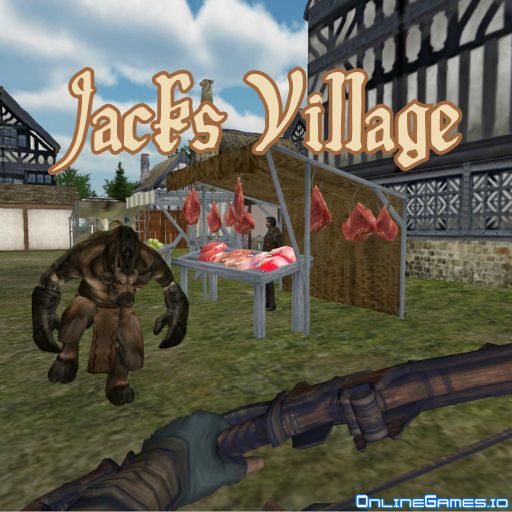
Jacks Village is a free online 3D first-person hero game where you play as Jack, defending your medieval village from waves of giant invading creatures with the help of local civilians. The game splits into two ways to play: a 15-mission Campaign mode with escalating objectives, like clearing 7 monsters in your very first mission using only a starting dagger, and an Endless mode where you roam the village freely while monsters continue to hunt you down. A medieval arsenal — dagger, mace, axe, sword, and bow with arrows — gives you several ways to fight back as you progress.
Jacks Village runs entirely in your browser with no download required, playable on desktop with keyboard and mouse controls. The combination of structured campaign missions and an open, monster-filled sandbox gives it replay value whether you want a clear objective to chase or just want to explore the village and fend off threats as they come.
Controls
| Action | Control |
|---|---|
| Move | WASD or Arrow Keys |
| Attack / Fire | Left Mouse Button |
| Switch Weapon | 1-5 Number Keys |
| Run | Left Shift |
| Crouch | Ctrl |
| Pause | ESC |
Campaign Mode
Campaign mode throws 15 missions at you, each with its own difficulty and requirements. Your very first mission asks you to take down 7 monsters using nothing but a dagger, limiting you to melee combat only — a deceptively tough opener that sets the tone for the missions that follow. Each successive mission raises the stakes, so mastering your melee swings early pays off later.
Endless Mode
Endless mode gives you the freedom to roam the village and interact with civilians without a fixed objective, but the danger never really goes away — monsters see you as a threat and will hunt you down no matter where you wander. It's the mode to pick when you want to explore at your own pace while still staying sharp for sudden attacks.
Weapons in Jacks Village
Jack's arsenal fits the game's medieval setting: a starting dagger for close, fast strikes, a heavy mace and axe for slower but harder-hitting blows, a sword for balanced melee combat, and a bow with arrows for picking off monsters from range. Switching between the 1-5 number keys lets you adapt your loadout to whatever the mission throws at you.
Tips for Winning at Jacks Village
In your first missions, stick close to civilians since they can help fend off monsters and give you breathing room to land clean melee hits. Use Left Shift to reposition quickly around a monster's attack rather than trading hits head-on, and switch to the bow whenever you can create distance, since ranged damage is safer than close-quarters combat against larger creatures.
How to Play Jacks Village
- Choose your mode — pick Campaign for structured missions or Endless to explore freely.
- Move through the village — use WASD or the arrow keys to navigate.
- Engage monsters — attack with the left mouse button using your equipped weapon.
- Switch weapons — press 1-5 to swap between dagger, mace, axe, sword, and bow.
- Use terrain and civilians — reposition with Shift and let civilians help absorb attacks.
- Complete mission objectives — clear the required number of monsters to progress.
- Survive and advance — work through all 15 campaign missions or keep surviving in Endless mode.
More Games Like This
If you enjoy hero-style combat games, try Bandits Multiplayer PvP, where you survive as a bandit among other cowboys in the Wild West. For more options, browse our Battle games collection.