Pixel Driver
About Pixel Driver
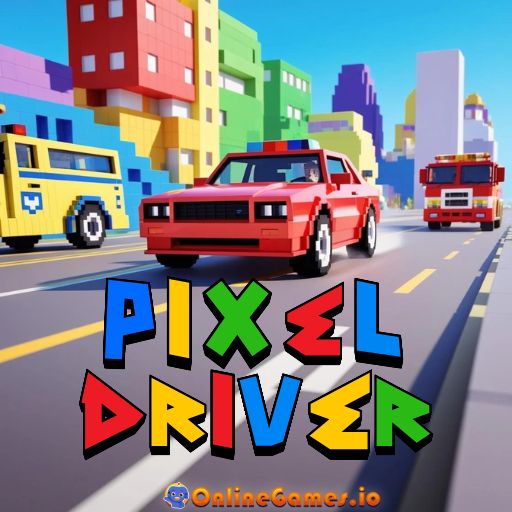
Pixel Driver is a free online driving game, developed by FreezeNova, built for players who just want a simple pixel car and a colorful blocky city to roam. You hop into a pixel-style car and explore streets shared with AI-controlled police cars, fire trucks, and ambulances, all of which keep the city feeling busy and alive. The game blends old-school pixel graphics with modern 3D visuals, giving it a nostalgic look without sacrificing smooth, modern movement.
Pixel Driver runs entirely in your browser with no download required, playable on desktop with keyboard controls. Two modes cover both moods you might be in — a timed Racing Mode for players who want a goal to chase, and a pressure-free Free Drive Mode for anyone who just wants to cruise, similar in spirit to relaxed driving games like Slow Roads.
Controls
| Action | Control |
|---|---|
| Drive | WASD or Arrow Keys |
| Nitro | Shift |
| Pause / Open Menu | Escape |
Racing Mode
Racing Mode challenges you to beat your best time around the pixel city while dodging AI-controlled traffic along the way. Nitro is your best friend on straight roads, letting you shave seconds off your lap, but tapping the brakes before tight corners keeps you from spinning out and losing more time than you gained.
Free Drive Mode
Free Drive Mode drops the timer entirely, letting you explore the city at your own pace, check out interesting spots, or practice drifting without any pressure. AI cars still populate the streets, so it never feels empty even without a race clock running.
Tips for Winning at Pixel Driver
Save nitro for long straightaways and let off it well before a corner, since carrying too much speed into a turn usually costs more time than the boost saved you. Learn the layout of the city in Free Drive Mode first, since knowing upcoming turns in advance is a bigger advantage in Racing Mode than raw speed. Watch for AI traffic patterns near intersections, where sudden crossings are the most common cause of unexpected crashes.
How to Play Pixel Driver
- Choose your mode — pick Racing Mode for a timed challenge or Free Drive Mode to explore.
- Start driving — use WASD or the arrow keys to move your pixel car through the city.
- Watch for traffic — avoid AI-controlled police cars, fire trucks, and ambulances.
- Use nitro on straights — hold Shift to boost your speed on open roads.
- Slow down for corners — ease off before tight turns to avoid crashing.
- Beat your best time — in Racing Mode, aim to improve your lap after each run.
- Explore freely — in Free Drive Mode, cruise the city without any time pressure.
Developer
Pixel Driver was created by FreezeNova.
More Games Like This
If you love driving games, try Madalin Stunt Cars Pro for crazy stunts and fast cars. For more options, browse our Driving games collection.