HOTSHIFT
About Hotshift
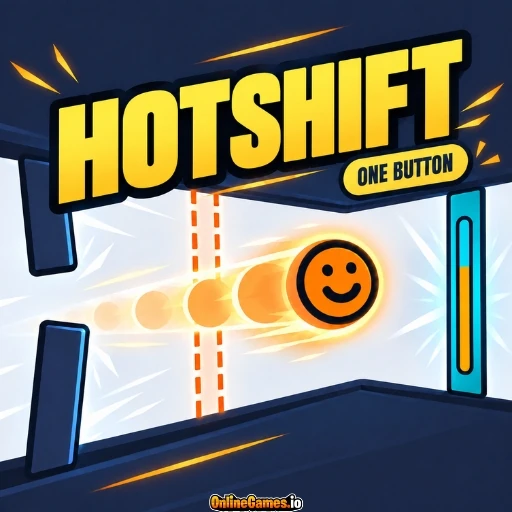
Hotshift is a free online one-button skill game where a single input does two things at once. Hold the button to rise and burn hot, then let go to fall and cool down, all while steering a small round character through a series of gates. Orange gates let you pass only while you are burning, and blue gates let you through only while you are cold, so every gap asks you to be in the right state at the right moment.
The twist is that rising means burning, so being high and cold at the same time is a puzzle, and that puzzle is the whole game. Levels start gently and grow trickier, teaching you to time your holds and releases until switching between hot and cold feels natural.
Controls
| Action | Control |
|---|---|
| Hold to Rise and Burn Hot | Hold Mouse Button, Touch, Spacebar, or Any Key |
| Release to Fall and Go Cold | Let Go of the Button, Touch, or Key |
| Pause | P or ESC |
| Retry Level | R |
Hot and Cold Gates
Each level places tall gates across your path, and the color of a gate tells you which state you need to be in. Orange gates let you pass only while your character is burning, and blue gates only open while you are cold. Your character changes color and expression as its temperature shifts, giving you a clear cue about which kind of gate you can safely cross at any moment.
Rising and Falling
Holding the button lifts your character upward, and letting go makes it drop, which means the height you need and the temperature you need are always pulling in different directions. Many gaps sit high while demanding a cold state, or low while demanding a hot one, so you plan your holds and releases ahead of time rather than reacting at the last second. A short on-screen hint at the bottom reminds you that holding makes you rise and burn hot, while letting go makes you fall and go cold.
Levels and Progress
The game offers 50 levels grouped into themed chapters, beginning with Warming Up, followed by Finding the Rhythm, and later chapters such as The Long Flicker. Each level shows its name, your best clear time, and a counter such as 4 out of 50 along the top of the screen. Levels unlock one after another, with locked ones greyed out until you clear the previous level, and the pause menu lists every level so you can replay any you have already beaten to improve your time.
Tips for Clean Runs
- Plan your next release before you reach a gate, because your character takes a moment to change temperature.
- Replay early levels to beat your best time, since the quick timing practice makes later chapters easier.
- Use short taps instead of long holds when you only need small height changes.
- Press R to retry right away after a mistake instead of waiting for the level to reset.
How to Play Hotshift
- Tap to start — Begin a level by tapping, clicking, or pressing any key.
- Hold to rise — Keep the button down to lift your character and burn hot.
- Release to fall — Let go to drop and cool down.
- Match the gates — Pass orange gates while hot and blue gates while cold.
- Clear the level — Reach the end to unlock the next level.
- Improve your times — Replay levels to beat your best clear time.
Developer
Hotshift is developed and published by Loose Bolt Games, available to play for free on OnlineGames.io with no download or account required. The game runs in-browser and is compatible with iOS and Android mobile devices.
More Games Like This
If you enjoy the precise timing of Hotshift, try Only Down for another skill game built around careful control, or browse the full collection of free skill games on OnlineGames.io.