Halloween Survival
About Halloween Survival
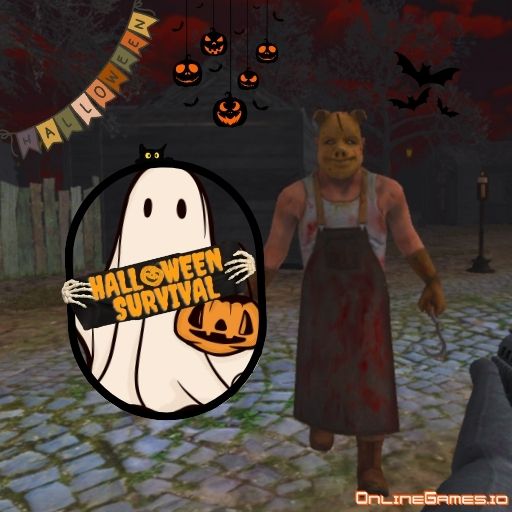
Halloween Survival is a free online multiplayer shooting game set in a misty town at midnight, where bats, mummies, knife-wielding butchers, witches, and even Frankenstein himself are all hunting you down. You can create a room and battle alongside friends, hit "Quick Playing" to drop into an available room with strangers, or head into a single-player Survival or Doomsday mode if you'd rather face the horde alone. Along the way you earn coins to buy and upgrade weapons, armor, and masks, giving every run a light progression layer on top of the core combat.
Halloween Survival runs entirely in your browser with no download required, and it's fully playable with a keyboard and mouse on desktop. The combination of limited visibility, relentless enemy waves, and both online and offline modes makes it a solid pick whether you want a quick solo shooter session or a spooky co-op battle with friends.
Controls
| Action | Control |
|---|---|
| Move | W A S D or Arrow Keys |
| Shoot | Left Click |
| Jump | Space |
| Crouch | C |
| Reload | R |
| Pick Up Gun | F |
| Switch Weapon | 1, 2, 3 |
| Open Menu | P |
Multiplayer and Singleplayer
Halloween Survival's multiplayer mode lets you team up with friends in a private room or connect with other players from around the world — just tap "Play Online" from the menu to create or join a game. If you'd rather play solo, "Play Offline" opens a screen where you choose between Survival mode, which tests how long you can hold out, and Doomsday mode, for a different flavor of the same nightmare. Either way, you're facing the same mix of monsters with limited visibility working against you.
Weapons, Armor, and Creatures
You earn money as you level up and level, which you can spend in the Weapons section to buy new guns or upgrade the ones you already own — some weapons only unlock once you've reached a certain level, and you're limited to three weapon slots, so choosing the right combination matters. The Armor section lets you customize your character's appearance with new outfits and masks. On the other side of the fight, you'll face stinky mummies, swarming bats, wicked witches, and even Frankenstein himself, each adding its own threat to the mist-covered map.
Tips for Winning at Halloween Survival
Crouch behind cover whenever a swarm of bats or a group of mummies closes in, since your visibility is limited and getting surrounded in the open is the fastest way to go down. Reload during lulls in the action rather than waiting until your clip is empty mid-fight, and keep a secondary weapon in your loadout for when you run dry unexpectedly. In multiplayer, stick near teammates so you can watch each other's backs, and prioritize upgrading your first weapon slot early since a stronger primary gun carries you through more of the game than spreading upgrades thin across all three slots.
How to Play Halloween Survival
- Choose online or offline — Tap "Play Online" for multiplayer or "Play Offline" for a solo run.
- Pick a mode — In offline play, select Survival or Doomsday mode from the menu.
- Gear up — Visit the Weapons and Armor sections to buy or upgrade your gear before heading out.
- Move and take cover — Use WASD or the arrow keys to navigate the misty map and crouch behind cover.
- Fight off creatures — Left-click to shoot mummies, bats, witches, and other monsters as they close in.
- Reload and switch weapons — Press R to reload and 1, 2, or 3 to swap between your equipped guns.
- Survive as long as you can — Keep fighting to earn coins and push your survival time further.
More Games Like This
If you enjoy the multiplayer combat of Halloween Survival, try ArmedForces.io, another multiplayer shooting game with a wide range of equipment options. Look for more shooting games and action games on OnlineGames.io.