Google Feud
About Google Feud
Google Feud is a free online word-guessing game built entirely around a simple, addictive idea: can you predict how the internet finishes a Google search? Each round shows you the start of a real autocomplete query, and it's your job to type in what you think the most popular completions are. The results are frequently hilarious, occasionally bizarre, and always a fascinating window into what millions of people are actually curious about — expect a mix of laugh-out-loud surprises and moments where you'll want to pause the game and check the real search results yourself.
Google Feud runs entirely in your browser on desktop, phone, or tablet, with no app to download and no account required. Because rounds are short and the categories are varied, it works just as well as a quick solo distraction as it does a party game — read the prompts aloud with friends or family and see who can channel their inner search-engine mind reader.
Controls
| Action | Control |
|---|---|
| Select a category | Mouse click |
| Type your guess | Keyboard |
| Submit a guess | Enter key |
| Move between guesses | Mouse click / Tab |
Categories and Scoring
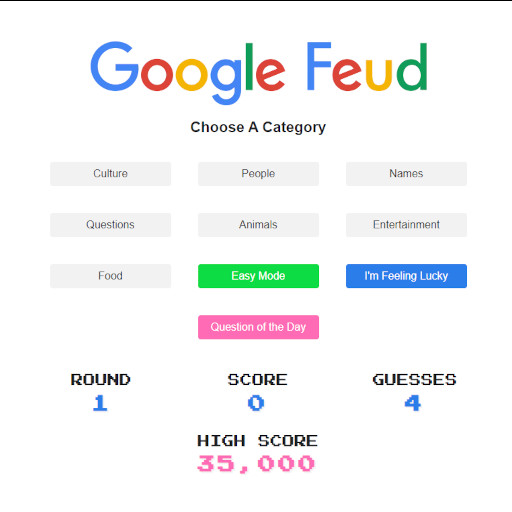
Google Feud offers 10 categories to choose from, covering topics like food, animals, culture, and more, plus an Easy Mode that's a good starting point if you're new to the game. Each round presents three separate search queries, and you get three guesses per query to land on the top autocomplete results. Correct answers pay out based on how popular that particular completion is, with rewards ranging from roughly 1,000 up to 10,000 points, so guessing the single most common completion is worth far more than scraping in a minor one.
Reading the Internet's Mind
The trick to doing well in Google Feud is thinking like an average searcher rather than like yourself — the highest-scoring answers are usually the most common, mundane completions, not the clever or obscure ones you might personally type. Vague, emotionally charged, or oddly specific phrasing tends to autocomplete in surprisingly consistent ways across millions of users, so lean into the obvious guess before you get creative. If you're playing with others, calling out guesses out loud before typing adds a fun quiz-show element to a normally solo experience.
Tips for Winning at Google Feud
Start with categories you know well in real life — food and everyday topics tend to have more predictable, higher-value completions than niche categories. Use all three of your guesses per query even if your first attempt feels wrong, since a wrong guess still narrows down what's left. Pay attention to the phrasing of the prompt itself; subtle wording often hints at whether the expected answer is a question, a comparison, or a simple noun. Finally, don't overthink it — the most popular searches are almost always the simplest, most literal ones.
How to Play Google Feud
- Open Google Feud — Load the game for free on OnlineGames.io, no download required.
- Choose a category — Pick from 10 topics, or start with Easy Mode if you're new.
- Read the query — Each round shows the beginning of a real Google search.
- Type your guess — Try to complete the search the way most people actually would.
- Submit and check — Hit Enter to see if your guess matches a real autocomplete result.
- Use your remaining guesses — You get three attempts per query, so keep trying if you miss.
- Chase the high score — Rack up points across rounds and categories to top your own best.
More Games Like This
If you enjoy the quick, quiz-style fun of Google Feud, explore more of our free mobile games and io games collections, all playable directly in your browser on OnlineGames.io.